Sunday, November 8, 2009

Last week I was in Louisville, Kentucky for the 2009 Association of Educational Communications and Technology (AECT) International Convention. AECT is "a professional association of thousands of educators and others whose activities are directed toward improving instruction through technology. "1 This year's conference was titled "Integrative Approaches: Meeting Challenges." My highlights were:
  • Hanging out for the week and attending the conference with Julie, my best friend from the University of Hawaii (UH).
  • Getting together with Ellen, Peter, Betsy, Curtis, Rachel, Ari, and Kim, UH professors and grad students.
  • Attending sessions on: engaging, effective, and efficient instruction (Merrill); technology literacy (Davies); learning through inquiry (Goodyear); US ed tech programs (Ku et al); structuring online instruction (Zydney & Byk); open courseware (OCW) (Parker); and cross-cultural instructional design (Tracey & Unger).
  • Supporting my colleagues at their presentations on: synchronous online professional development (Leong & Eichelberger); and social networking (Hoffman).
  • Volunteering at the convention and meeting other volunteers.
  • Meeting other graduate students and finding out about their programs.
  • Learning about Louisville. Especially the visits to Churchill Downs, the Muhammad Ali Center, the Louisville Slugger Museum, and the neighborhoods wtih old Victorian houses.
It was a good week. The next conference I go to I'll have to present some of my research :-)

----------
(1) AECT (2009). www.aect.org

Friday, October 23, 2009

Universal Design for Learning

Adam has trouble seeing the words on the page so converting text to audio helps him "read" his assignments. Beth has trouble comprehending print materials, a combination of visual tracking and audio help her. Charlie has trouble decoding words, a readily available dictionary helps him. Packaged together in one piece of software such as Kurzweil 3000, multiple assistive technologies meet the needs of a variety of students.

A classroom of 25 students has 25 different ways of processing information and learning. Presenting information in different ways and using different teaching techniques address the various student needs present in a classroom. Technology can greatly aide this endeavor.

A month ago (has it really been so long?) I wrote a post about Universal Design (UD), an architectural principal which seeks to create accessibility through design. The Center for Applied Special Technology (CAST) has identified a similar design principal for education, Universal Design for Learning (UDL). UDL has three principles1:
  • Multiple means of representation to give learners various ways of acquiring information and knowledge
  • Multiple means of action and expression to provide learners alternatives for demonstrating what they know, and
  • Multiple means of engagement to tap into learners' interests, challenge them appropriately, and motivate them to learn
By varying how information is presented, students motivated and learning assessed, more students will have access to learning. By using the principles of UDL, these variations will be built into lessons. It's a good combination.

----------


Wednesday, October 14, 2009

Of Mice and Men

"The best-laid schemes o' mice an 'men
Gang aft agley" - Robert Burns

I planned to post to my 699 Blog three to five times a week. Nearly two weeks have gone by since I last posted. So sorry, mice and men.

I have added a cool widget to my blog. Odiogo makes a tool that automatically converts blogs to webcasts. The widget will read the post within the blog or make it available for subscription. For computer users with print disabilities, audio could be helpful for accessing blog content.

Saturday, September 26, 2009

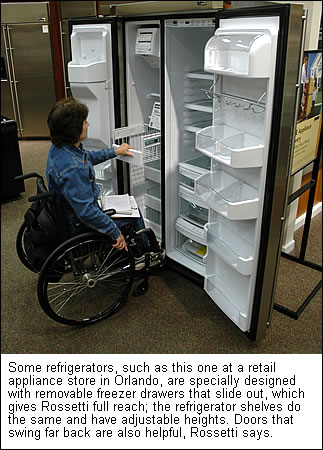
Universal Design

Suppose that accessibility issues were not addressed as afterthoughts in the production process of new products but were included within the design phase. And then suppose that these products proved advantageous not only to people with disabilities but to all people. This is universal design. "The intent of universal design is to simplify life for everyone by making products, communications, and the built environment more usable by as many people as possible at little or no extra cost. Universal design benefits people of all ages and abilities", according to The Center for Universal Design at North Carolina State University in Raleigh.1

Curb cuts are perhaps the most widely adopted and well known universal design feature. Designed to make sidewalks more accessible to people who use wheelchairs and those with other mobility impairments, curb cuts have benefited bikers, people pushing baby carriages, deliverymen, skateboarders, people pulling grocery carts, and everyone at one time or another. Universal design products range from kitchen tools, to appliances, to entire homes.

The Center for Universal Design has established seven Principles of Universal Design2:
PRINCIPLE ONE: Equitable Use
The design is useful and marketable to people with diverse abilities.

PRINCIPLE TWO: Flexibility in Use
The design accommodates a wide range of individual preferences and abilities.

PRINCIPLE THREE: Simple and Intuitive Use
Use of the design is easy to understand, regardless of the user's experience, knowledge, language skills, or current concentration level.

PRINCIPLE FOUR: Perceptible Information
The design communicates necessary information effectively to the user, regardless of ambient conditions or the user's sensory abilities.

PRINCIPLE FIVE: Tolerance for Error
The design minimizes hazards and the adverse consequences of accidental or unintended actions.

PRINCIPLE SIX: Low Physical Effort
The design can be used efficiently and comfortably and with a minimum of fatigue.

PRINCIPLE SEVEN: Size and Space for Approach and Use
Appropriate size and space is provided for approach, reach, manipulation, and use regardless of user's body size, posture, or mobility.
As universal design features are incorporated into more products and structures, the need for assistive technology should decrease. Why? Because the accessibility is built into the product or structure as part of the design; exceptional equipment is not needed by some people with disabilities.

----------
(2) The Center for Universal Design (1997). The Principles of Universal Design, Version 2.0. Raleigh, NC: North Carolina State University.

A Brief Introduction to Disabilities

Assistive technology is used to compensate for the loss of a normal human functioning. Understanding which impairments affect functional losses is the beginning of designing, producing, and selecting for service assistive technology.

The Trace Center at the University of Wisconsin-Madison works to make computers accessible to people with all types of disabilities. As part of their process, Trace has written "A Brief Introduction to Disabilities"1. The document gives a brief introduction to visual impairments, hearing impairments, physical impairments, cognitive/language impairments, seizure disorders, and multiple impairments, listing some specific barriers to accessibility that people with these disabilities encounter.

In "Thirty-Something Million: Should They Be Exceptions?"2 an article highlighting the importance of designing products with disabilities in mind, Vanderheiden lists several statistics about the number and types of disabilities in the United States. One of the interesting point he makes is that as people age they naturally lose functional ability, they become disabled. Vanderheiden displays with well placed graphs to illustrate his point that if one lives long enough then one is likely to need adaptations and assistive technology.

One more point from Thirty-Something Million: as the population ages the learning disabilities, the prevalent disability in the younger years, gives way to mobility, vision, and hearing disabilities as the prevalent category in the older years. Learning disabilities are the top issue that schools have to address. While the least restrictive environment must be maintained for all, learning disabilities are prevalent in the K-12 years.

----------
(1) Vanderheiden, G. C., & Vanderheiden, K. R. (1991). A brief introduction to disabilities. [Online]. In Accessible Design of Consumer Products: Guidelines for the Design of Consumer Products to Increase Their Accessibility to People with Disabilities or Who are Aging (pp. 84). Madison, Wisconsin: Trace Research & Development Center.
(2) Vanderheiden, G. C. (1990). Thirty-something million: Should they be exceptions? [Online]. Human Factors, 32(4), 14.

Tuesday, September 22, 2009

Low Vision Technology Fair

Today I attended the "Low Vision Technology Fair" at the Beltrone Living Center in Albany, NY. The event, presented by the Northeastern Association of the Blind at Abany (NABA), consisted of program presentations, vendor displays, and vision-related group displays. I was there for about two hours and learned a great deal about assistive technology (AT) for the blind and visually impaired.

I participated in a presentation titled "Independent Mobility & Travel with Vision Loss" given by Harriet Seeley of NABA. Seeley's job is to train those with low or no vision to orient themselves to their environment and travel safely. She displayed a number of devices which could be used in this endeavor, all of them low tech. Canes with red and white markings that indicated visual impairment, both collapsible and those which could also be used for support, were demonstrated. Ice grippers, bright reflective vests, sun/glare glasses, telescopes, sports goggles were also shown. All these devices could be obtained from NABA, free-of-charge to legally blind individuals, and their use would be supported by specialists at the organization. Seeley finished be demonstrating a sighted guide technique whereby a person with sight guides a person with low or no vision. It seems the best mobility aid isn't a device but a friend.

I made my rounds of the exhibitions after the mobility presentation. Only one vendor was displaying handheld magnifiers and low tech optical devices. Five companies represented - ABISee, Eschenbach, Freedom Scientific, Humanware, Magnisight - displayed their electronic magnification devices. Not a surprise, since this was a "tech fair". The companies had hand-held, table, and computer-attachable devices. These had built in cameras which fed the image of text to a display. Some of the larger devices could snap an image of the text, send it to an OCR engine, and then create text-to-speech output. A few of these units could use the cameras to zoom in on distant images, like the blackboard in a classroom. The smaller devices ran about $500 while the larger ones seem to be in the $3000 to $4000 range. When asked Bill Kilroy, the Freedom Science representative, said that high tech readers were becoming more popular than low tech magnifiers.

Ai Squared exhibited their screen reader, ZoomText, at the fair; Freedom Scientific provided a demo disk for their screen reader, JAWS. This technology reads everything on a computer screen as the user navigates using keyboard commands. Ai Squared can be used in conjunction with a special keyboard that has shortcuts to popular commands. My conversation with Bill Kilroy included his thoughts on using JAWS. I said that I had tried screen readers but had trouble following them when I could easily see what was going on the screen. He said that a user had to understand how files are organized and computers operate in general to be able to use one with a screen reader. Then it was all a matter of training.

WMHT's Radio Information Service (RISE) was represented at the fair. Volunteers read newspapers, national magazines, and books of interest over the air. Qualified people with print disabilities can borrow a special radio that picks up the signal. While not considered a new technology, radio has a place as an assistive technology. The telephone too, can be assistive technology. The United Way Northeast Region 2-1-1 connects people with information over the phone.

I learned a great deal at the Low Vision Technology Fair. Thanks NABA!

Sunday, September 20, 2009

Local Disability Groups

Having done my last post on assistive technology & accessibility groups, I started thinking about groups that are available in my local area. To search for local disability groups I went old school. Yes, it's an actual phone book! I used the Capital District Area Yellowbook1 to search for local disability groups. I'm reporting here some of results of my search under the heading which I found them in phone book.

Blind Persons Institutions. Only one listing appeared under this heading: NYS Commission for the Blind & Visually Handicapped.

Disabled Persons Svces. & Organizations. Most of the listings under this heading appear to be residences for people with disabilities. The Capital District DDSO (Developmental Disabilities Services Office; I had to look up the acronym on the web, so much for old school) itself lists ten residences and a number of offices. Non-residential listings include Associations for Retarded Children Inc, Centers for Disability Services, the Center for Independence, the Down Syndrome Aim High Resource Center, the Hansen Disability Management, Parent-To-Parent of New York State Support Services, and Saratoga Bridges.

Health Care Consultants. There were a number of listings under this heading, a number of which appeared to deal more with advisors, providers, or insurers. The Center for Healthy Policy Studies, the Center for the Disabled, and New York State Industries for the Disabled were listed here.

Hearing Impaired Svces. Auxiliary Relay Services was the only listing under this heading.

Support Groups. The only listing was for Overeaters Anonymous.

There was nothing under headings for assistive technology, deaf, mobility, or vision. I located a couple leads in my phone book search but nothing I couldn't have found in a few minutes with a web search. So much for the old school; back to Google.

----------
(1) Yellow Book Sates and Distribution Company. (2009). Yellowbook: Capital District Area, NY.

Wednesday, September 16, 2009

Assistive Technology & Accessibility Groups

Providing assistive technology and facilitating accessibility are two very large jobs. Several groups have been formed over the years to work on issues related to assistive technology and accessibility. In today's blog post I just want to mention a few that I've come across.

The Accessibility Interoperability Alliance (AIA) "encourages the enhancement of current technologies, the creation of new technology, and promotes the implementation of Application Programming Interfaces (APIs) and specifications cross-platform and across the industry." Starting with the Microsoft Active Accessibility (MSAA), APIs have been created to support AT tools and applications. The AIA seeks standardization of the interface for better interoperability.

The Alliance for Technology Access (ATA) is a network of technology resource centers, community-based organizations, agencies, individuals, and companies whose mission is to "increase the use of technology by children and adults with disabilities and functional limitations." Using a consumer-directed model, the ATA's 40 centers offer technology consultations, training, lending libraries, family advocacy, information and referral.

The Assistive Technology Industry Association (ATIA) is "a not-for-profit membership organization of manufacturers, sellers and providers of technology-based assistive devices and/or services." The ATIA puts on the the largest AT conference in North America, "speaks with a common voice" for the AT industry, and supports publications.

The International Game Developers Association Game Accessibility Special Interest Group "helps the game community strive towards creating mainstream games that are universally accessible to all, regardless of age, experience and disability." This advocacy group promotes awareness of the problems people with disabilities have using computer games and helps provide solutions.

These organizations are only a few of those working on assistive technology and accessibility issues.

Sunday, September 13, 2009

IDEA Disability Categories

I am always looking to categorize information. Doing so makes it easier for me to make sense of the world. To effectively study assistive technology, I want to know in which areas the technology will be used. I searched for an existing categorization of disabilities and found the one outlined in education law to be applicable to my interests.

The Individuals with Disabilities Education Act (IDEA) is the United States federal law that governs services to people from birth to 26. One of the main implementations of the law is in guiding special education in schools. The law lists 13 categories of disability under which a student would qualify for services. They are:
  1. Autism
  2. Deaf-blindness
  3. Deafness
  4. Emotional disturbances
  5. Hearing impairment
  6. Mental retardation
  7. Multiple disabilities
  8. Orthopedic impairment
  9. Other health impairment
  10. Special learning disability
  11. Speech or language impairment
  12. Traumatic brain injury
  13. Visual impairment
Specific definitions for these categories can be found on the US Department of Education's website.1

The President's Commission on Excellence in Special Education sought to simplify the categorization of disabilities. They reported, "from the viewpoint of the assessment and identification process, there are three major types of disorders:
  1. Sensory disabilities such as visual impairments, hearing impairments, deaf-blindness;
  2. Physical and neurological disabilities such as orthopedic impairments, other health impairments, traumatic brain injury, multiple disabilities, autism; and,
  3. Developmental disabilities such as specific learning disabilities (SLD), speech and language impairments, emotional disturbance, mild mental retardation and developmental delay." (p 21)2
The commission's recommendations have not been adopted but they provide a simplified categorization. Still, The 13 categories in IDEA will make it somewhat easy to match assistive technology devices with a specific disability.

----------
(2) President's Commission on Excellence in Special Education Report. (2002) A new era: Revitalizing special education for children and their families. Washington, DC: Author. Available at hhttp://www.ed.gov/inits/commissionsboards/whspecialeducation/reports/index.html.

Thursday, September 10, 2009

Connecting to Learn

In Connecting to Learn: Educational & Assistive Technology for People with Disabilities1, Marcia Scherer writes about peoples' need to feel connected to their environment and to each other. She posits that vision and hearing loss lead to a feeling of unconnectedness. Persons with these disabilities are unable to sense environmental clues and have difficulties in some aspects of communication. She advocates matching assistive technology (AT) to students with vision and hearing disabilities, connecting them for greater learning opportunities.

Assistive technology for hearing loss comes in five categories:
  • Hearing aids are sound amplification devices worn by the individual.
  • Alerting and signaling devices use light or other visual clues to draw attention to a situation like a fire alarm.
  • Devices to amplify sound in group situations use broadcast methods, like FM radio signals, to provide individual receivers with a signal.
  • Telephone devices like a TTY send non-voice signals over phone lines.
  • Telecommunications devices and accommodations for telecommunications technology provide individual amplification for TVs and other telecom devices and also provide closed captioning.
Assistive technology for vision loss, like that for hearing loss, depends on the degree of loss. For example:
  • Low vision individuals can use magnification and contrast heighteners.
  • Legally blind individuals can use CCTV, magnification, and alternative I/O (input/output) devices for computers.
  • Totally blind individuals can use braille, portable note takers, OCR (optical character recognition), and alternative I/O devices.
Scherer provided several statistics within her work. The number of people with hearing loss in the United States is between 22 and 28 million. Vision loss affects about 8 million. Both of these are considered "low incidence" disabilities because of the low numbers of affected individuals. In schools, .15% of the population is serviced for a hearing impairment, .06% for a vision impairment. These numbers, from the 1995-96 school year, compare to 12.43% of the population receiving some kind of special services for a disability.

----------
(1) Scherer, M. J. (2004). Connecting to learn: Educational & assistive technology for people with disabilities. Washington, DC: American Psychological Association.

Saturday, September 5, 2009

Apple Accessibility

Last week I wrote about accessibility in Microsoft. This week I took at accessibility in Apple products at http://www.apple.com/accessibility/. Macs have lots of accessibility features that are built into OS X. Features include: the screen-reader, screen maginification, talking alerts, and screen adjustments for those with vision problems; closed captioniniong, visual alerts, and chatting for those with a hearing problems; and speech reconnition, on-screen keyboards, and support for alternative input devices for those with mobility problems. All these features are controlled from the Universal Access menu in a Mac's System Preferences.

The Apple site links to a ninety minute podcast on the accessibility features in Mac OS X. The podcast showed many of the features, highlighting the screen-reader, VoiceOver. The announcer showed several of these features. They look really great with my eyes open. It would be a big stretch for me to try an navigate the screen on voice commands. Still, Mav VoiceOver looks better, in the demos, than the Microsoft Navigator.

VoiceOver is also available on the iPhone. I love my iPhone and will be testing the screen-reader and other accessibility features on the phone in the near future.

Thursday, September 3, 2009

Microsoft Accessibility

Microsoft's stated mission is to enable people and businesses to reach their full potential. They "deliver on that promise by striving to create technology that is accessible to everyone—including people who experience the world in different ways because of impairments and disabilities." 1 Microsoft touts the accessibilty of its products at http://www.microsoft.com/enable/. The site contains product information, demos, tutorials, research reports, and case studies. Also on the site, the company also outlines four areas in which its accessibility efforts are councentrated.

Microsoft builds accessibility tools into their software. The Vista Operating System includes an Ease of Access Center, speech recognition, a magnifier, a text-to-speech navigator, captioning, an on-screen keyboard, mouse alterntives, and visual notifications. Microsoft Office and Internet Explorer contain similar tools designed to allow for increased productivity and ease of navigation on the Internet. A cursory examination of these tools indicates a bit of a learning curve is involved.

Microsoft provides leadership and awareness. The company publishes matrials, runs resource centers, helps schools and businesses, and works with industry leaders.

Microsoft researches innovations. The company funds research, hosts an accessibility center, works with manufactures, and develops user interface automation. Several of the white papers on their website show potential for indepth study.

Microsoft collaborates with other organizations. The company works with government agencies, NGOs, other businesses, industry organizations, and advocacy groups. The Accessibility Interoperability Alliance (AIA), Alliance for Technology Access (ATA), Association of Assistive Technology Act Programs (ATAP), the DAISY Consortium, and the American Association of People with Disabilities (AAPD) are just a few of the named groups.

So far this post sounds like a commercial for Microsoft. (Full disclosure: I am a very very minor shareholder and a PC user.) I think the first place to start in any study is at the source. Microsoft products are the most widely used on computers and thus their commitment to accessibility will have a large impact on what is available to persons with disabilities. The assistive technology products, leadership, research, and organizations mentioned here bear further investigation. They will be the topics for posts in the near future.

----------

Tuesday, September 1, 2009

Disability Studies

This term I'm also taking a disability studies class. One of the issues addressed in the class is defining disability. A medical model defines disability in a physical way; an individual's deviation from the norm needs intervention to be corrected. A social model defines disability in an environmental way; society puts up barriers that prevent people from accessing buildings, communication, education, etc. A policy/legal model defines disability in a statutory way; the Americans with Disabilities (ADA) Amendment Act of 2008 says "With respect to individuals, the term 'disability' means (A) a physical or mental impairment that substantially limits one or more of the major life activities of each individual; (B) a record of such an impairment; or (C) being regarded as having such an impairment." 1

How one defines disability could have an impact on assistive technology. Is the onus on the individual to limit their actions to those that can be preformed using personal devices? Or does society have a responsibility to remove obstacles so that persons with disabilities are not restricted? Is providing assistive technology the responsibility of the individual or society?

I have to say that, like many issues, the right answer probably falls in the middle. The individual bears some of the responsibility but we as a society must make provisions for all our members. I think the ADA (and IDEA) show that our country realizes this sociatal responsibilty for providing this access to our citizens.

Monday, August 31, 2009

Volunteer Work

Today I put my application in to volunteer for the Northeast Association for the Blind (NABA). Two things were interesting about my application. First, they asked if I had any volunteer experience. I had to say "no" but I qualified it by saying "not recently". I did several volunteer jobs when I was a teenager but of late I haven't really given back to the community the way I think I should. Second, they asked why I was interested in volunteering for NABA. I said that I was interested in helping out, learning about the blind community, and giving back. All true. But is it for them or me?

Friday, August 28, 2009

Assistive Technology Definition

The Assistive Technology Act of 1998, US Public Law 105-394, defines an assistive technology device as "any item, piece of equipment, or product system, whether acquired commercially, modified, or customized, this is used to increase, maintain, or improve functional capabilities of individuals with disabilities." 1 The definition is broad and inclusive, as befitting a law on assistive technology. Any device that aids a person with a disability should be recognized as assistive technology.

To promote my own better understanding and research, I have to categorize devices in my mind. I break down Assistive Technology (AT) into high-tech and low-tech devices. A hearing aid would be high tech because it involves electronics and a ear horn would be low-tech because it does not. I would further break down high-tech devices into those which require computational processing, i.e. a computer, and those that don't. The hearing aid would not, whereas a speech-to-tech device would. It is the computational assistive technology devices which interest me most.

---------

Thursday, August 27, 2009

Write About It

I'm going to be researching assistive technology this term. I'm also going to be writing about assistive technology in this blog and in more academic pieces. Writing is important for a PhD student. Since one learns to do something by doing it, I'll be learning to write by writing. I guess learning isn't exactly the write word. I wouldn't be a PhD candidate if I couldn't string together at lease a few paragraphs. But a dissertation is a lot more than a few paragraphs. So to increase my writing skills, I've gotta write.

It is therefore my goal to write in this blog three to five times a week this term. Just a few paragraphs on what I'm studying. Or, if a particular article, observation, or topic really hits me, perhaps more. The objective is to write. If you get a chance, let me know how I'm doing by commenting on this blog.

Wednesday, August 26, 2009

Observation, Discussion, Demonstration, and Investigation

Being a tech person, I find "things" fascinating. I look over technologies which are new to me, trying to ascertain their full range of uses. I watch as they are used. I ask for explanations and demonstrations. Sometimes I find these technologies so cool that I have to have them. The iPhone is just such device. But most of the time I just find them fascinating.

Of late I find myself with a heightened awareness of the "things" people with disabilities use. Some of these things fascinate me. When the bus kneels and produces a lift for people with mobility problems, I think that's cool. I saw a man with vision problems using a cane to get around and I wondered how he worked it. Technology doesn't have to be high tech to fascinate me. I've yet to see anyone use the headphone jack at an ATM but I think it's a good idea to have it there. I have to try it myself some time.

Getting to my point, this term my study of assistive technology will involve observations of the technologies in action. It will involve discussions with those that use assistive technology and those who produce it. My research will involve demonstrations of technology tools like those presented at the "Low Vision Technology Fair" in my Albany, NY. And, of course, my investigation will involve a review of literature.

Tuesday, August 25, 2009

Choice of Study Topic

Yesterday I outlined my objectives for this term. Today I want to answer the question: "Why assistive technology?" I have, at this point, three reasons to want to study assistive technology.

First, it's a condition of my educational leave from DoDDS, the Department of Defense Dependents Schools. When I requested leave, I agreed to study assistive technology because it was an area identified by the school system as being essential and in critical need. DoDDS states it's first goal as increased student achievement and seeks to have every student reach his full potential. To this end, resources have been committed to providing the tools necessary to assist those with disabilities. Furthermore, DoDDS hires and trains people to see that assistive technology is used in the most effective manner to meet Goal One. I plan to support teachers, staff, and students in this endeavor when I return to DoDDS.

Second, I was recently diagnosed with a degenerative eye disease, RP. I'm slowly losing my vision and want to know what tools will be available when I need to call upon them. Not a very altruistic reason but often times it is the challenges in our path that lead us in new directions. Assistive technology is a new direction for me. I may never need the services of this technology and, if I do, the technology will surly have changed when I need it. Still, best to get in on the ground floor of technology and see how it grows.

Finally, I think that many of the technologies invented to meet the needs of individuals with disabilities can end up assisting all students. For example, I've seen a speaker system employed in classrooms in which a student has hearing difficulties. The teacher wears a microphone and her words are amplified to assist the student with a hearing disability. But the other students also hear the amplification. And when a student is chosen to read aloud or talk to the whole group, he uses the microphone to be heard. Using the microphone can focus the attention of all students on who is talking; passing the microphone can signify that it is another student's turn. There are affordances to assistive technology that should be explored and used for the benefit of all students.

Monday, August 24, 2009

First Day of Class

Today is the first day of the Fall 2009 Term at the University of Hawaii. Students enrolled in traditional and online classes will receive the course syllabus today. Within the syllabus the objectives of the course will be outlined and, most likely, the professor will spend a good part of the first class discussing how the objectives will be met. I'm enrolled in an independent study class, ETEC 699. On this first day of class, I'm going to outline my course objectives.
  1. Know what assistive technology devices are available to aid people with disabilities.
  2. Comprehend how assistive technology is used in everyday living.
  3. Apply the usage of assistive technology to meet educational goals of individuals with disabilities.
  4. Analyze the use of assistive technology by people with disabilities within educational settings.
  5. Synthesize assistive technology uses into the broader goal of educating all students using the most appropriate means.
  6. Evaluate the use of assistive technology to improve education.
Wow, these are some lofty goals! Borrowing a phrase from politicians, I reserve the right to revise and extend my objectives. It's going to be a good term.